
Documentation Index

Fetch the complete documentation index at: https://testdocs.ecomelixir.com/llms.txt

Use this file to discover all available pages before exploring further.

Advertorial and listicle page examples
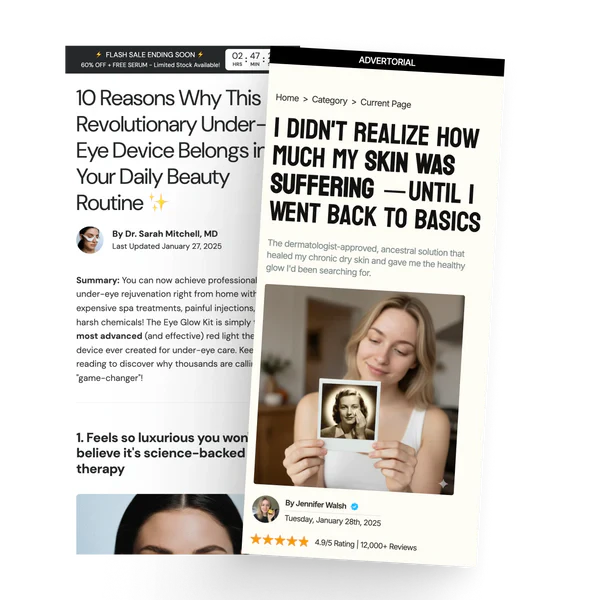
Elixir includes dedicated page templates for advertorial and listicle style landing pages — the kind of long-form content pages used in paid advertising funnels.

Advertorial pages

Advertorial pages look like editorial content (blog posts, news articles, reviews) but are designed to sell. To create one:
  1. In Shopify admin, go to Online Store → Pages.
  2. Create a new page.
  3. Under Template, select Advertorial.
  4. Open the page in the theme editor to add blocks.

Available blocks

BlockWhat it does
HeadingArticle headline
AuthorAuthor name, photo, and date
TextRich text paragraphs
Image / VideoMedia content
ButtonCall-to-action button
ReviewIndividual customer review
RatingStar rating display
Amazon ReviewsAmazon-style review block
BannerPromotional banner within the content
SidebarSticky sidebar with featured product, rating summary, and feature list

Listicle pages

Listicle pages present content as a numbered list (e.g. “10 Reasons Why…”). To create one:
  1. In Shopify admin, go to Online Store → Pages.
  2. Create a new page.
  3. Under Template, select Listicle.
  4. Open the page in the theme editor to add blocks.

Available blocks

BlockWhat it does
Listicle headerPage title and intro
Listicle itemStandard numbered entry
Listicle item highlightFeatured entry with emphasis styling
SummaryConclusion block
Sticky add to cartFixed buy bar that follows the user on scroll
TimerCountdown timer for urgency
Callout quotePull quote or highlighted callout

Tips

  • Use the sale countdown banner announcement bar with advertorial pages to add urgency
  • Add a sidebar block with a featured product to keep the CTA visible as users scroll
  • Keep the sticky add to cart block enabled so users can buy at any point